Release 020
CurrentRelease 020 · VEX 0.4.0
The desk, on paper.
0.4.0 is a visual release. The desktop app moves to a new design language: paper by day, Night Ledger at night, one blue, square edges, and status shown by fill instead of coloured dots. The window now opens like a book, with a sepia print on the left page, your sessions numbered down its side, and a pixel eagle whose flight shows what the agent is doing.
What it does not change matters as much. The agent, your data, your keys, the approval rules and the signing path are the same code paths as in 0.3.1. Every approval card now looks like what it is: a request to move real funds.
This release covers the work merged after 0.3.1. 83 commits · No database migrations
01 · A new look
Paper by day. Night Ledger at night.
The light theme is paper and ink. The dark theme is Night Ledger, a deep brown room with the same ink logic. Both carry one blue, used only where you can act or where something needs you.
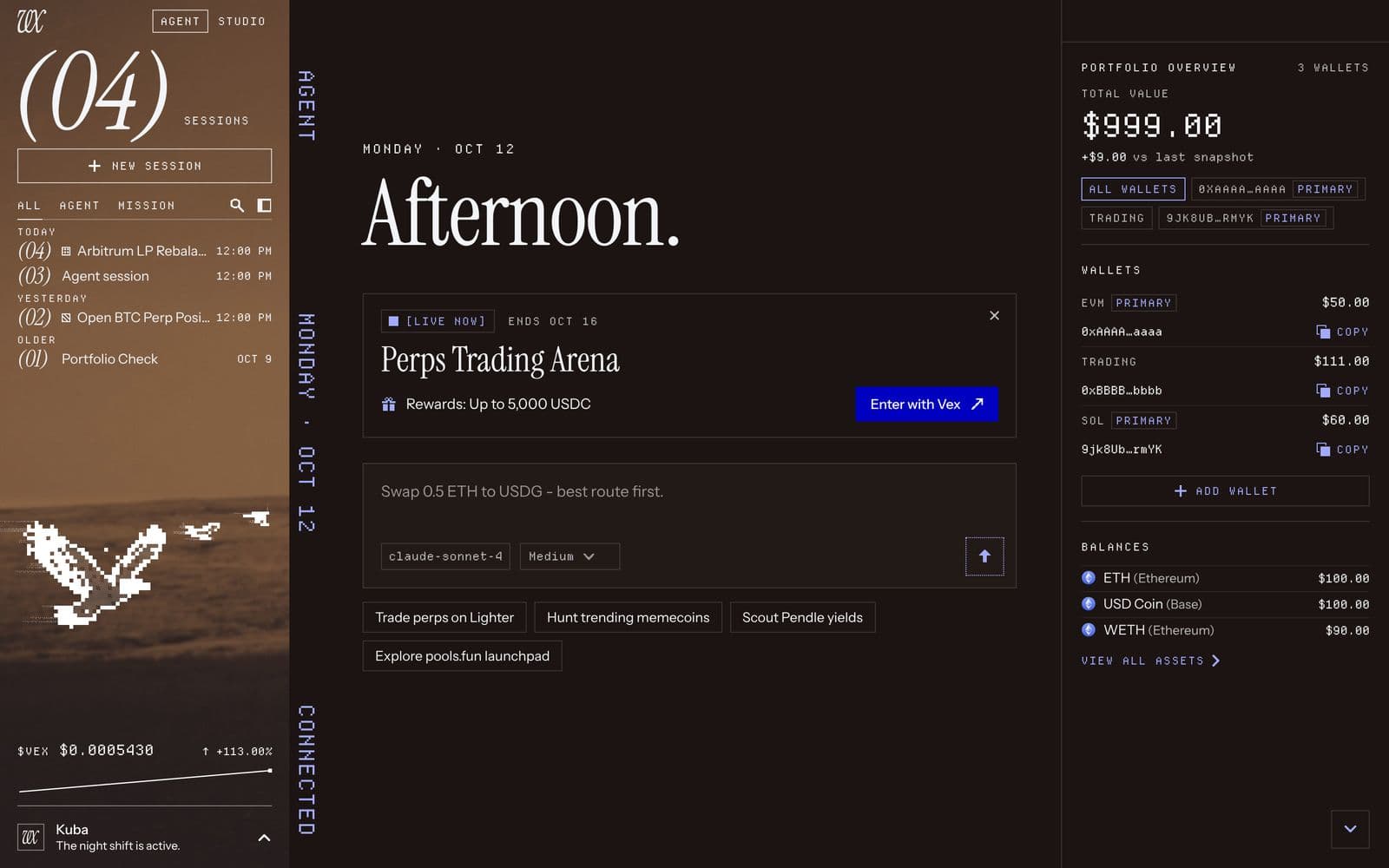
Square and flat. No glass, no blur, no shadows, no rounded corners. Surfaces are opaque, separated by thin rules.
Status by fill. A solid, dotted, hatched, outlined or targeted swatch replaces the old coloured dot, so a state reads the same in both themes and without relying on colour. Errors speak in ink, not red. Chart candles keep their green and red.
New type. Instrument Serif for titles and counters, Instrument Sans for reading, Departure Mono for labels and figures. The terminal, code blocks and raw JSON keep JetBrains Mono.
Pixel icons. One set of 109 pixel icons replaces the outline glyphs. Restricted access is now a shield with a check, Full access a shield with "!". The lock and the key keep their meanings: the vault and your API keys.
Contrast was measured, not eyeballed. Every text tier is measured against every surface it sits on, in both themes: at least 4.5:1 for text and 3:1 for the large counters.
02 · The open book
One spread, four columns.
The window is laid out as a spread: the left page, a narrow gutter, the centre page where you talk to the agent, and the BOOK on the right with Portfolio, Board and Lighter.
The left page. A sepia plateau print carries the session index, New session, the All / Agent / Mission tabs, the $VEX line and your profile. A large italic counter shows the open session's number, or how many sessions you have on the welcome page.
Sessions keep their numbers. Each session gets a number the first time VEX sees it, oldest first, and keeps it. Pinning, filtering or removing other sessions does not renumber it.
The running head. The old status strip folds into the head of the centre page: mission controls, the agent's current state word, notices, pending approvals and export.
Room is shared predictably. Below 1276 px the left page closes to a 56 px spine, which Lighter and Studio always use. The centre page never drops below 640 px. A narrow BOOK folds its tabs into icons that keep their names as labels and tooltips.
03 · The eagle
The agent's state, drawn.
Five states. The Desktop eagle and its flock show whether the agent is Idle, Live, Running, Awaiting your approval or Paused. They read the same turn, mission and approval state as the running head's word, so the drawing and the word cannot disagree.
It holds still for you. While an approval is pending, the flock stops and waits.
Quiet when nobody is looking. Only Live and Running move. Drawing is capped at 30 frames per second, skips frames when nothing changed, and stops while the window is hidden or the print is off screen.
Reduced motion is respected. With reduced motion or Save-Data, every canvas paints one still frame and the page turn becomes a short crossfade.
04 · Real funds, on every card
An approval looks like what it is.
Every wallet in VEX Desktop is a real wallet, so every approval card now carries the same treatment, whatever its risk, action or origin: inline in the chat, in the approvals panel and in the Lighter desk's review dialog.
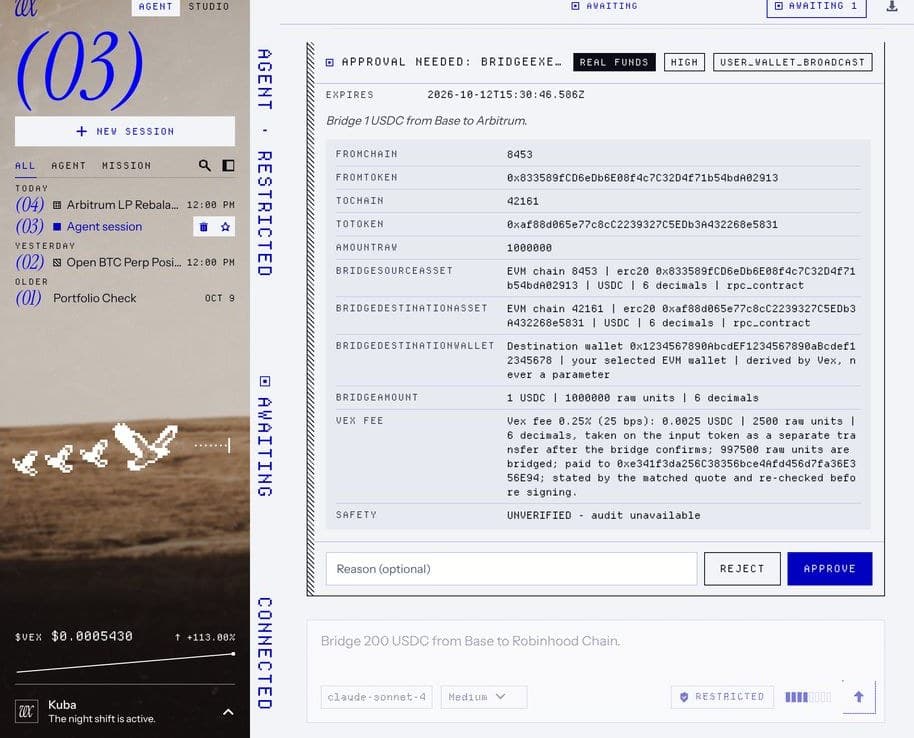
The REAL FUNDS frame. An ink frame, a hatched band down the leading edge and a reversed "Real funds" stamp in the card's head. A dither veil covers the session page and the BOOK behind the card, so the request stays the sharpest thing on screen.
Facts you can read. The signed fields sit in mono in a separate well, one row per field. The agent's reasoning is set apart in italic.
The safer key comes first. Reject keeps first focus. Approve is the one blue fill. The high-risk "Click again to confirm approve" step and the in-flight lock work exactly as before.
This is a visual change. What an approval binds to, how it is revalidated and what gets signed are unchanged.
05 · Everywhere else
The same language on every screen.
Unlock and setup on one stage. Unlock, the startup checks, Docker, services, migrations and the setup wizard all stand on the same plateau print. Unlock greets you with the release number and "Welcome back." Entering the app turns the page.
The composer. A square field with the model and reasoning effort as chips, the context meter as a row of cells, and a square send key.
The Lighter desk. Market bar, chart, order book, ticket, account dock and setup in Departure Mono. Long is the blue fill and Short the ink fill, each with its arrow. Core and Robinhood Chain share one palette and are named by their switch.
Studio. The project rail sits on paper, the workspace is a plain field, and the terminal palette is retuned to match.
Board, Settings and overlays. Board token cards are square ledger tiles with status chips. Settings reads as an index of italic numerals. Memory, Sessions, asset registers, Agent Scan and token history open as one paper sheet over the centre, with the left page still in place.
06 · The window
A hidden title bar on every OS.
macOS. The traffic lights sit on the print.
Windows and Linux. The native window controls are drawn as an overlay in the theme's colours and recolour when you switch themes. The head rows are drag regions, clear of the window controls.
A Linux fallback. On a Linux desktop without Window Controls Overlay support, start VEX with VEX_NATIVE_FRAME=1 to keep the native frame.
The minimum window size stays 1000 x 720.
07 · Community
Who built it.
V10 Spread, the redesign, was built by desu777 (#212, with the Windows and Linux window-control fix in #213). mandatedisrael made the Studio file watcher test reliable on Windows CI (#214).
All nine CI jobs passed on the release commit, covering Linux, macOS and Windows desktop suites, PostgreSQL, the bridge, the packaged payload and end-to-end tests. Main CI results.
08 · Before you update
Upgrade notes.
No database migrations ship in this release.
Your sessions, settings, wallets and theme choice carry over. On first launch 0.4.0 numbers your existing sessions, oldest first; new sessions take the next number, and numbers then stay put. A custom backdrop image you set earlier now sits on the left page.
The layout and every surface look different. Stores, data, keyboard shortcuts, labels, approval behaviour and the signing path do not.
No manual action is required.